
Telegram Guide
Set up a Telegram support team with one bot. Create a private group, add agents, and reply to customers together.

Damian Ledesma
September 9, 2026
•
5 minutes

Create Telegram bot commands that show in the menu and send fixed answers, links, files, and other support information.
Telegram bot commands are short actions that start with /, such as /hours or /pricing. A command menu puts common answers beside the message field.
Set one reply for every command in the menu.
Telegram suggests registered commands when someone types /. The Menu button near the message field can show the same list with short descriptions.
Commands are separate from buttons inside a message and from the bot's web-app menu button. Use them for repeatable questions or actions people need at any time.
Use clear, specific names. Telegram commands start with /, can use lowercase Latin letters, numbers, and underscores, and can be up to 32 characters long. A name such as /opening_hours tells people more than /info.
Commands need a bot that is already set up to reply. If you have not set up a bot yet, create it in @BotFather, connect it to a service, and add the first reply.
For a no-code Telegram support bot, connect the token through @SUCH. The no-code support bot setup shows the full first setup, including the welcome message and team access.
Set SUCH custom commands in the bot chat.
/set_command./opening_hours.- when the command should work as a clickable link in a message but should stay out of the menu.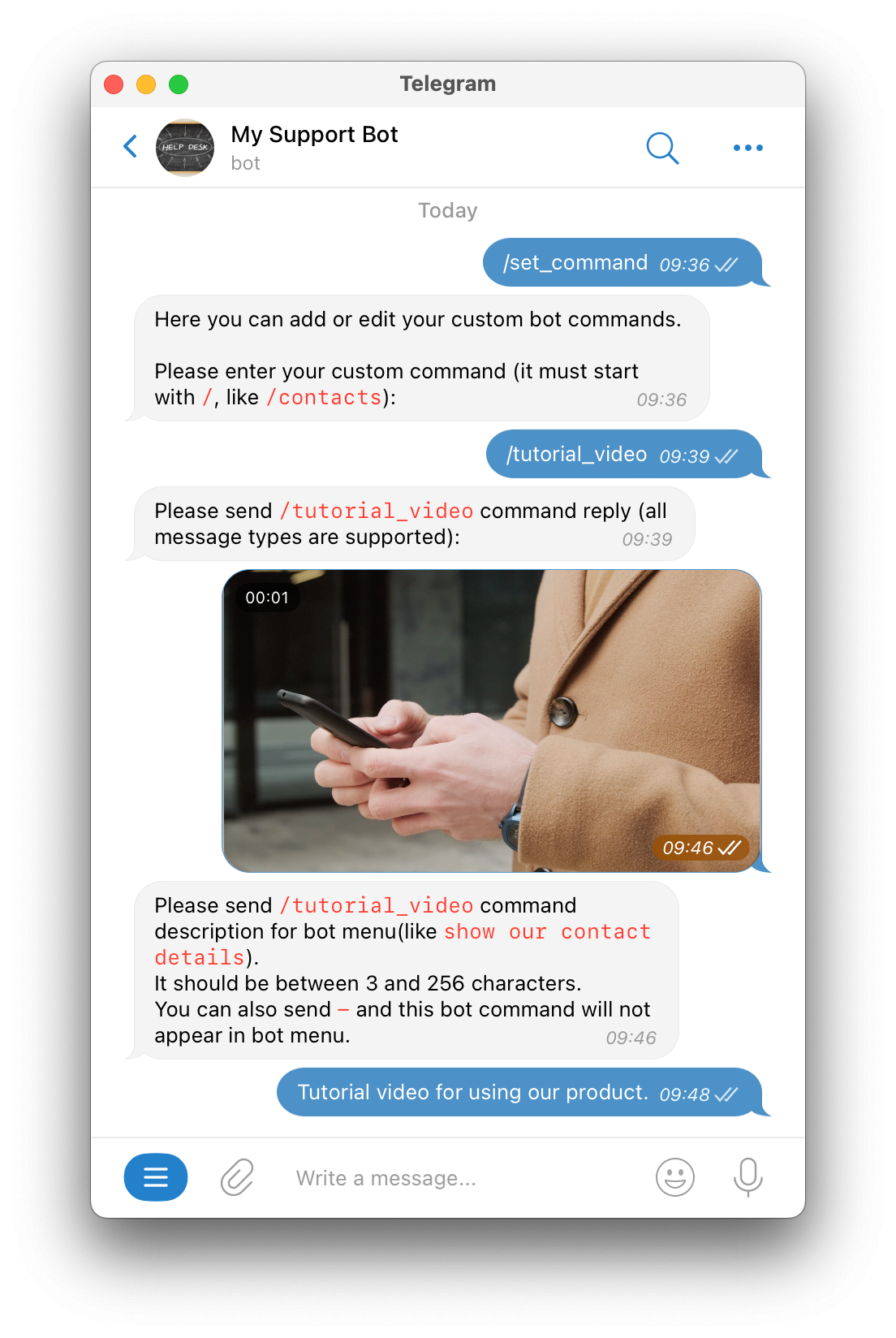
Use the custom commands help page while you set the first one.
Build the menu from questions your team answers every week.
/opening_hours for when the team is available./pricing for a clear price page or a short price explanation./guide for the most useful getting-started article, file, or video./contact for the next step when a person needs help.Give every command one job. When two commands send people to the same place, keep the clearest name and remove the other one.
Use commands for answers that must stay the same: a price page, opening hours, a policy, a guide, or a file.
Use Bot AI for questions that people ask in their own words. In SUCH, Bot AI can answer from the bot's Instructions and Knowledge, while a command can give one fixed reply. This Telegram AI agent builder guide explains how those two types of reply can work together.
Use custom commands for several small, repeatable answers. Use the web-app menu button for one main page, such as a help center, form, or resource page. In SUCH, custom commands show instead of the web-app menu button. The Telegram Mini Apps and bots guide explains the page route.
Open the bot from a second account and type /. Check each description, then tap every visible command.
Then check these details:
To remove a custom command in SUCH, send /delete_command to the bot, then send the command you want to remove.
Not always. A custom-built bot needs code that handles each command. In SUCH, you can create a fixed command reply by using /set_command in the bot chat.
Add or update that command's reply with /set_command in the SUCH bot chat.
Yes. When SUCH asks for the command description, send -. The command can still appear as a clickable link in a bot message.
No. When a SUCH bot has custom commands, Telegram shows those commands instead of the web-app menu button. Pick the route that makes the next action easiest to find.
Set up a Telegram support team with one bot. Create a private group, add agents, and reply to customers together.
Write a useful Telegram bot welcome message with 20 examples for support, sales, communities, courses, and more. Set it in SUCH without code.