
Best Telegram Bots
Create a free AI agent on Telegram with SUCH. No coding needed—easy step-by-step guide with free AI credits included.

Damian Ledesma
August 18, 2025
•
5 minutes

Build a no-code Telegram AI support bot with a clear job, correct knowledge, simple instructions, tests, and an easy human handoff.

A Telegram AI agent can answer repeated support questions in normal language. It is useful when people ask the same thing in different words and your team has clear, correct answers.
You can create this type of bot without code in SUCH. First create a Telegram bot in @BotFather. Then open @SUCH, connect the bot token, and set up its AI, knowledge, and team access in app.such.chat.
Start with one small support job. A narrow bot is easier to set up, test, and improve.
| If people often need... | Give the bot... | What the person gets |
|---|---|---|
| The same link or file | A custom command | A short reply with the link or file |
| Answers to common questions | Bot AI with approved knowledge | /human for unusual cases |
| Help with an account-specific issue | A welcome message and team route | A team reply in the same chat |
| Help finding the right topic | Bot AI Instructions with clear topics | A short question or /human |
For example, a course bot can answer questions about lessons, schedule, and access. A product bot can answer questions about plans, setup, and common problems. Keep payments, refunds, account security, and special cases for the team.
@BotFather in Telegram and send /newbot.After the bot is connected, open app.such.chat, select the project, and open Project Settings. This is where you set the welcome message, commands, AI, and team settings.
In Project Settings, open Bot AI and turn it on. Choose Support bot. Then choose the AI model you want to use.
The first version needs two things:
Write Instructions like this:
Answer questions about the course schedule, lesson access, and files. Keep answers short. When the answer is not in the provided knowledge, ask the user to send
/human.
This tells the bot what to answer, how to write, and when to bring in a person. The instructions should match one real support job, not every task in the business.
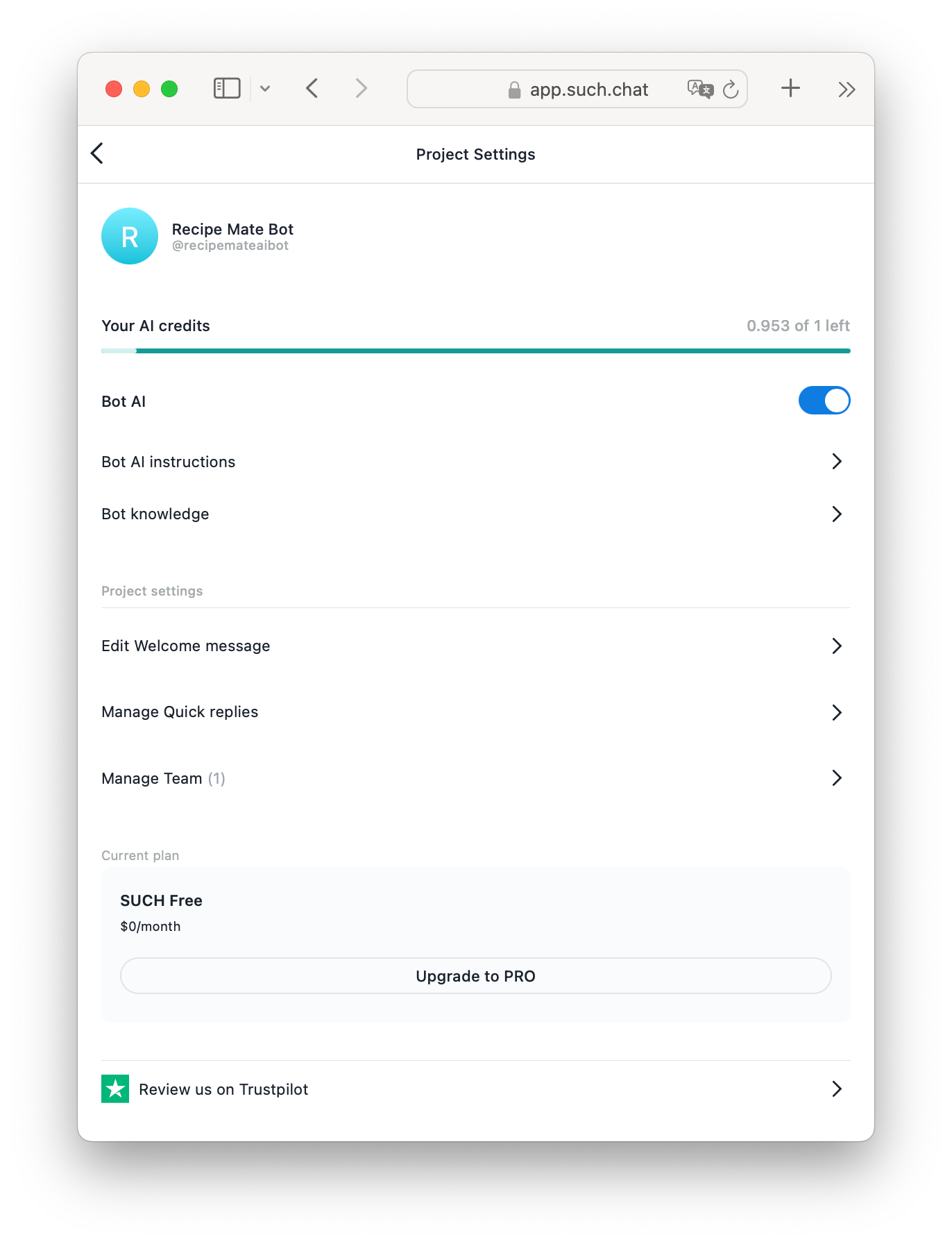
Add one small topic at a time in Bot Knowledge. Good first topics are:
Keep each block short and update it when the information changes. Add the exact answer your team wants customers to receive. Start with ten real questions from recent conversations, then test whether the bot can answer them correctly.
For a wider introduction to the feature, read how to build an AI chatbot without code.
AI is useful when people write the same question in many ways. Use custom commands when the answer must always be the same.
For example, create /price, /guide, and /contact for stable answers. A command can send text, a link, a photo, a video, or a file. This gives people a fast route to common information and keeps the AI focused on real questions.
Put this sentence in the welcome message: Need a person? Send /human and our team will reply here.
Then add the same rule to Bot AI Instructions. When the bot cannot answer, it should tell the user to send /human instead of guessing.
To connect the team, create a private Telegram group, add the support bot, send /team to @SUCH, and add agents in Manage Permissions. Team members can reply in Telegram or in app.such.chat.
When a user sends /human, the chat becomes Open for the team. After the team closes the chat, AI can answer a later question again. The full process is explained in this chatbot-to-human handoff guide.
Use a separate Telegram account or ask a colleague to test the full conversation.
/human and check that the team sees the Open chat.Fix one problem at a time: unclear Instructions, missing Knowledge, a missing command, or a team setting. Small improvements make the bot more useful than adding a large amount of information at once.
Choose this setup when your team answers the same approved questions every week and customers use different words to ask them. Use commands for fixed information and team replies for questions that need a decision.
This balance gives customers quick answers without making support feel like a dead end. It also keeps the first version simple enough for a small team to manage.
No. Create the Telegram bot in @BotFather, connect it through @SUCH, and set up Bot AI, Instructions, Knowledge, and team access in app.such.chat.
State the topics the bot can answer, the tone to use, and the next step for questions it cannot answer. Keep the instructions short and specific.
Start with current facts your team already uses: setup steps, price details, rules, access information, and useful links.
Yes. Ask users to send /human. The chat becomes Open, and your team can reply in the same Telegram conversation or in the SUCH web app.
Create a free AI agent on Telegram with SUCH. No coding needed—easy step-by-step guide with free AI credits included.

Build no-code Telegram AI chatbots for free. Easy to create, customize, and manage in just minutes.