
Telegram Features
See what a Telegram poll result shows, how to view votes over time, and how to use the result for a clear community decision.

Damian Ledesma
September 12, 2026
•
6 minutes

Telegram Bot Privacy Mode controls group access. Bots receive messages you send them, not your phone number or other chats.

A Telegram bot can receive your public display name, username, profile picture, and anything you send to it. It does not automatically get your phone number or access your other Telegram chats. In a group, its access depends on Telegram's Privacy Mode.
That difference matters before you send a file to a bot or add one to a private group. A direct chat gives the bot the messages you send. A group can give it more access when its group setting allows it.
When you message a bot, it receives the message so it can reply. This includes text, photos, documents, voice messages, and other files that you choose to send.
Telegram also gives the bot basic public profile details, such as your display name, username when you have one, and profile picture. This helps a bot show who sent a support request or continue a conversation with the right person.
The same rule applies to a support bot made with SUCH. When a customer sends the bot a question, the conversation can appear for the owner or support team to handle. It does not give the bot access to the customer's unrelated chats.
A bot does not automatically receive your phone number. It receives a number only when you decide to share contact information through Telegram.
It also cannot browse your contact list, read your other private chats, open files on your device, or see messages from groups it has not joined. Sending a message to one bot does not give it access to the rest of your Telegram account.
Be just as deliberate with attachments as you are with text. If you send a receipt, screen recording, or document to a bot, the service running that bot receives it to process the request.
Privacy Mode is a Telegram setting for bots in groups. It is on by default.
With Privacy Mode on, Telegram sends a bot the group messages that are meant for it. This includes commands for that bot and replies to its messages. The bot does not receive every normal conversation in the group.
With Privacy Mode off, the bot can receive the human messages sent in that group. A bot that is made a group administrator can also receive all group messages. This is useful only when the bot's job needs the full conversation, such as group support or moderation.
You can check the bot's access in the group member list. Telegram shows whether the bot has access to messages. If it does, everyone in the group should know that the bot can receive the group conversation.
Keep Privacy Mode on when a bot only needs commands or replies. Turn it off when the bot must receive ordinary messages from group members.
@BotFather in Telegram./setprivacy.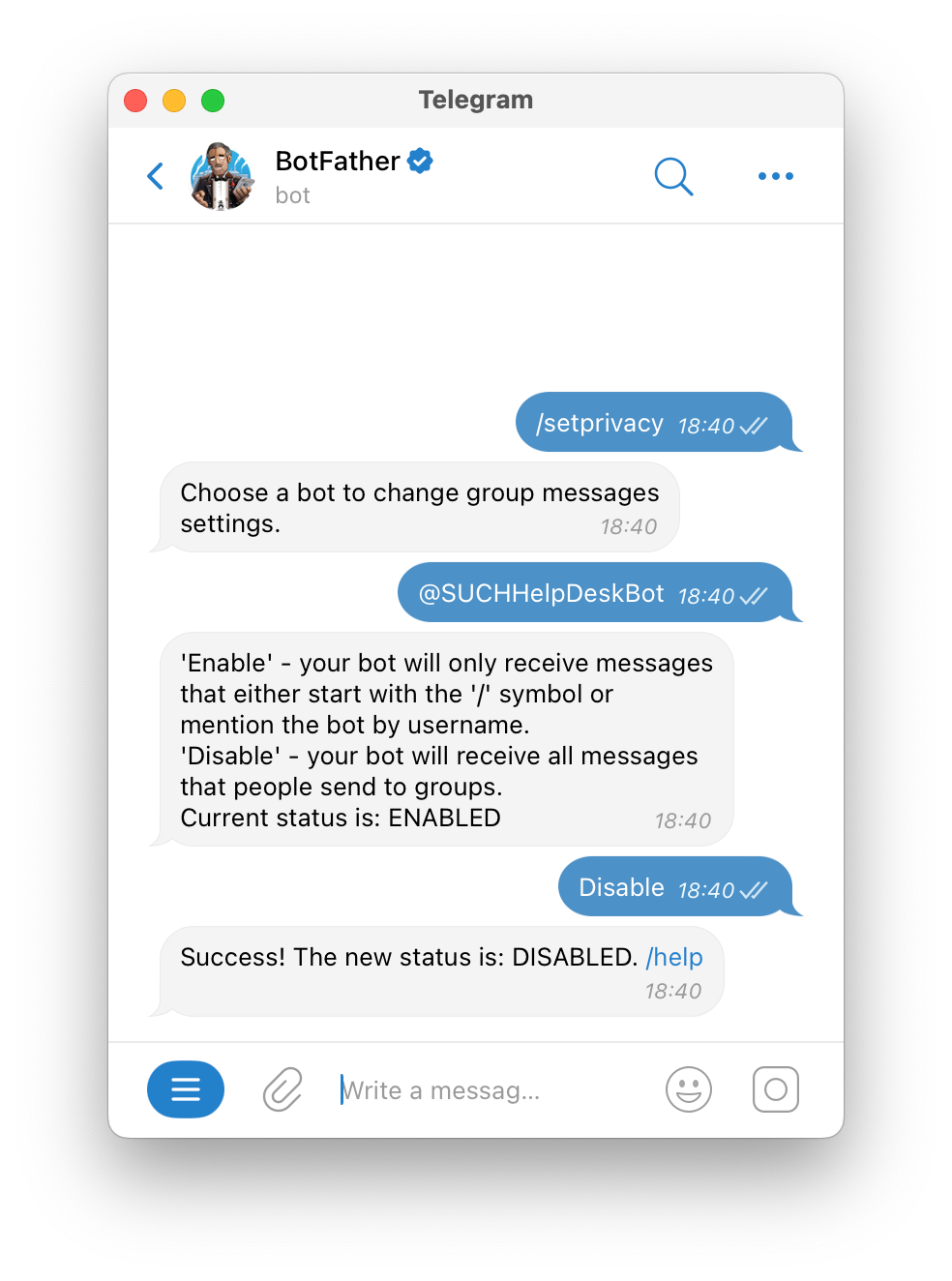
BotFather confirms whether the bot receives only messages directed to it or ordinary group messages too.
Telegram applies the new setting when the bot joins the group. Without the remove-and-add-again step, a group where the bot was already present can keep the old behavior.
The setting is about that group. It does not give the bot access to your private conversations or to other Telegram groups.
Most support bots work in a private conversation: a customer messages the bot and the team replies there. That setup does not need group Privacy Mode to be disabled.
If your community needs support inside a Telegram group, SUCH PRO can handle that group conversation. First connect the bot to SUCH, then add it to the support group. Disable Privacy Mode in BotFather so the bot can receive questions from group members.
The SUCH group-support guide shows the supported setup. It also explains that the bot receives messages from people in that group, including media they send. It does not receive messages from other bots or from groups where it is not present.
For a shared support team, give agents access through the documented multiple-agent setup. They can reply to customer conversations without receiving the private BotFather token. Keep that credential under the control of the bot owner, as explained in the Telegram bot token guide.
Before adding a bot to a private group, say what it is there to do. For example: "This support bot receives group questions so our team can reply. Do not send account passwords, payment card details, or other information you would not send to our support team."
This lets members decide what to share and where to ask a sensitive question instead.
Not automatically. A bot receives a phone number only when you choose to share contact information with it.
It can when the bot has group-message access. By default, Privacy Mode limits it to messages directed to the bot. A group administrator bot or a bot with Privacy Mode disabled can receive human messages sent in that group.
No. A normal bot receives the content that Telegram sends to it, such as a direct message or messages from a group it belongs to. It cannot browse other chats in your account.
No. Secret Chats are one-to-one chats between Telegram users. Use a normal bot chat when you want a bot to receive and answer a message.
No for normal one-to-one support. Disable it only when you use SUCH PRO to receive ordinary messages from a Telegram group.

See what a Telegram poll result shows, how to view votes over time, and how to use the result for a clear community decision.

Telegram Mini Apps open a web interface inside Telegram. See when to use a Mini App, a bot, or both, and how they work together.