
Telegram Guide
Set up a Telegram support team with one bot. Create a private group, add agents, and reply to customers together.

Damian Ledesma
September 9, 2026
•
5 minutes

Get a Telegram bot token from BotFather, keep it private, connect it safely, and revoke it if it may be exposed.
A Telegram bot token is a private code that lets a service run one Telegram bot. Get it from @BotFather, give it only to the service that will operate the bot, and replace it straight away if it may have been exposed.
A person or service with the token can operate the bot. Keep it out of public posts, screenshots, shared documents, code repositories, and unrelated conversations.
BotFather asks you to choose a name and a username when you create a bot. The username is public. People use it to find the bot, mention it, and open its public Telegram link.
The token is private. It gives a service permission to send and receive messages as that bot. Never put the token in the bot description, a channel post, or a link. Choose the public part carefully with this Telegram bot username guide.
@BotFather in Telegram./newbot.bot.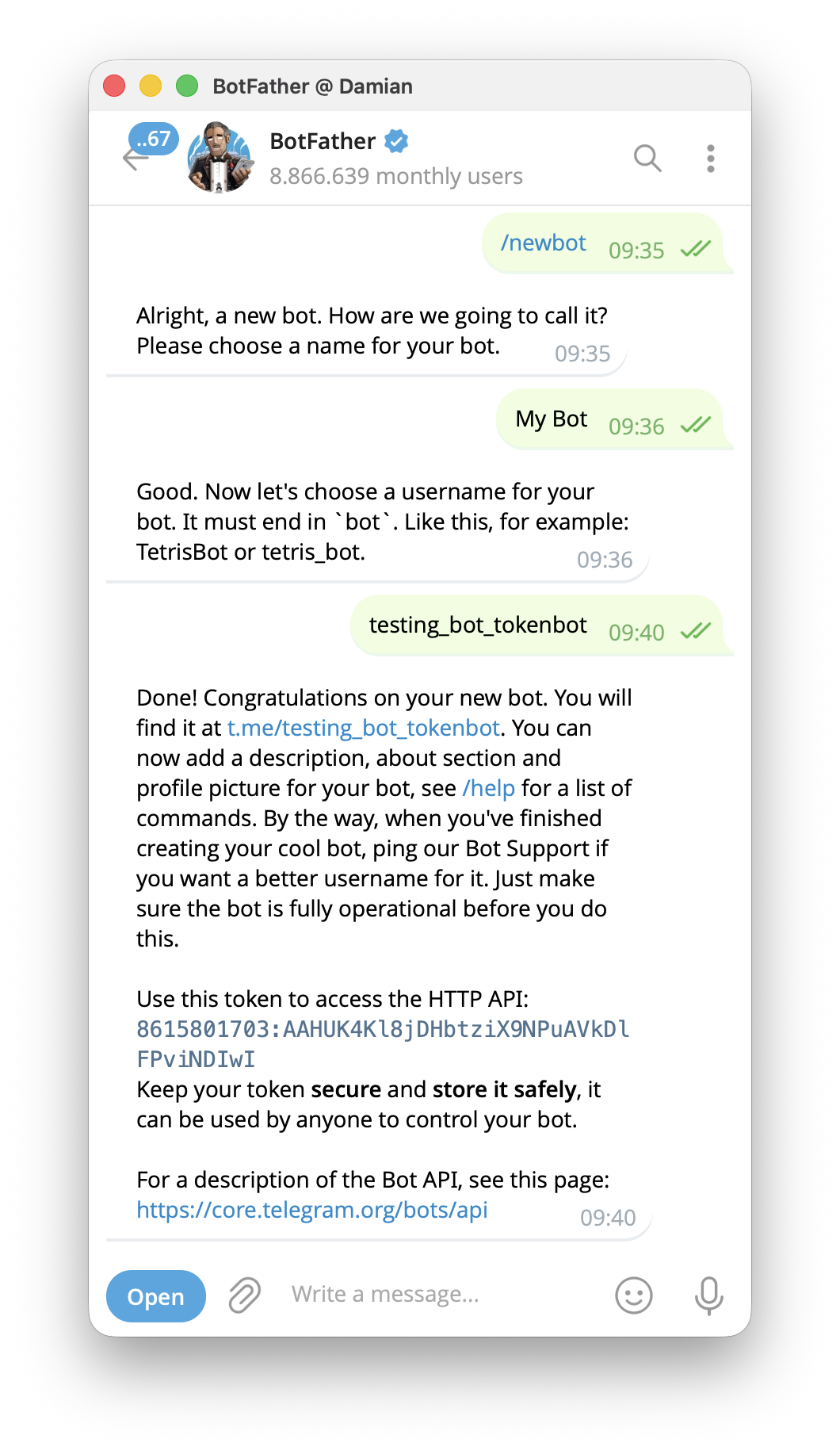
The bot now exists, but it has no replies or support setup yet. Keep the token in a private place until you connect the bot to the service that will run it.
A new bot can receive messages, but it does not answer customers until a service runs it. You can build that service yourself, or use a no-code support setup. The no-code route lets a team add its first replies and support tools without writing or maintaining bot code.
Continue with a no-code Telegram support bot setup when you are ready to add the first replies.
To use that route, open the verified @SUCH bot in Telegram and send the token through its guided connection. This connects the bot to your SUCH project.
Then open app.such.chat to set the welcome message, quick replies, team access, and optional Bot AI.
Only send the token to a person or service that you have chosen to operate the bot. You do not need it to share the bot with customers, add people to a team, or promote the bot.
Store the token in one secure place. A password manager is a good choice when you need to copy it later. If a trusted developer runs a custom bot for you, use a private credential-sharing method, not a group chat or screenshot.
Do not put the token in:
If you cannot be sure who saw a token, treat it as exposed. Replacing it is safer than trying to remove every copy.
Revoking a token replaces the private code. It does not delete the bot or change its public username.
@BotFather./revoke and select the affected bot. You can also use /token to create a replacement token for an existing bot./new, then send the replacement token when it asks. This reconnects the bot.The old token stops working after it is replaced. Any service still using it will lose access to the bot, so update the bot runner before you return to normal work.
If a token appeared in a public repository, post, or screenshot, revoke it first. Removing the visible copy is still worth doing, but it does not make the old token safe again.
Team members usually need access to the support work, not the bot credential. In SUCH, add the right people as team agents. The team setup guide shows how to connect a private Telegram group and choose the agents who can reply. They can reply to customer conversations in Telegram or in the web app without receiving the BotFather token.
Keep BotFather under the control of the person or business that owns the bot. That makes it easier to replace a token and check who can manage the bot later.
Telegram also has an API ID and API hash for people building lower-level Telegram applications. They are different from a bot token.
For a regular Telegram bot, the token comes from @BotFather and authorizes the bot. Most people creating a no-code support bot only need that token. Do not paste an API ID or API hash where a bot token is requested.
Once the bot is connected and its first replies are ready, share its public username or Telegram link. Use these practical ways to promote a Telegram bot with a clear reason for people to open it.
No. The token is private authorization for the bot. Share the bot username or Telegram link with users instead.
Open @BotFather and use /token to create a new one for the bot. Then update the service that runs the bot with the replacement.
No. The bot and its public username stay in place. The old private token is replaced, so it can no longer run the bot.
No. You need the token to connect a bot to the service that will run it. A no-code builder such as SUCH can handle a Telegram support bot without a custom program.
Set up a Telegram support team with one bot. Create a private group, add agents, and reply to customers together.
Write a useful Telegram bot welcome message with 20 examples for support, sales, communities, courses, and more. Set it in SUCH without code.