
Support Bots
Standard Telegram bots, including SUCH bots, cannot start a private chat. Customers must press Start or send a message before the bot can reply.

Damian Ledesma
November 13, 2026
•
6 minutes

Add a Help Center link to a Telegram support bot. Use SUCH's menu button, choose the right customer route, and keep human help easy to reach.

Customers should not have to write a support agent just to find an installation step, a policy, or a known fix. A Help Center gives them one reliable place to browse those answers from your Telegram bot. The bot chat stays available for a question about their own account or anything the page does not answer.
For a SUCH support bot, the Help Center is a public page behind the bot's menu button. You do not need to build a custom Mini App for an existing Help Center, and the page does not automatically become Bot AI Knowledge.
Start with questions your support agents already answer repeatedly. Add a short Start here page, then the few pages that remove the most repeat conversations: setup steps, access or billing rules, common fixes, and a clear contact route.
Keep personal account details, exceptions, and anything needing a decision in the bot chat with a support agent. Put a plain next step at the end of each key page, such as: Still need help? Send your question in this bot chat.
| Customer needs to... | Best route | Why |
|---|---|---|
| Browse setup guides, policies, or common fixes | Help Center menu button | One public page gives the customer a place to explore at their own pace. |
| Get one short, fixed answer or link | Custom command | A command can send a prepared response for a specific request such as /pricing or /guide. |
| Ask a routine question in their own words | Optional Bot AI | Bot AI can answer from the Instructions and Bot Knowledge that the bot owner has configured and tested. |
| Get help with a specific account, order, exception, or missing answer | Message the support bot | A support agent can see the context and reply in the same Telegram conversation. |
For detailed command setup, see the Telegram bot commands guide. For Bot AI, use the Instructions and Knowledge guide and add its approved sources separately.
Have the public Help Center URL ready first. It should work on a phone and only require sign-in when the support information is deliberately restricted.
Choose the visible menu route before you add it. Use a Help Center button for one guide destination, or custom commands for several short answers. When the bot has custom commands, Telegram shows those commands instead of the web-app button. A command response can still include the Help Center link.
/menu_button.Help Center or Help.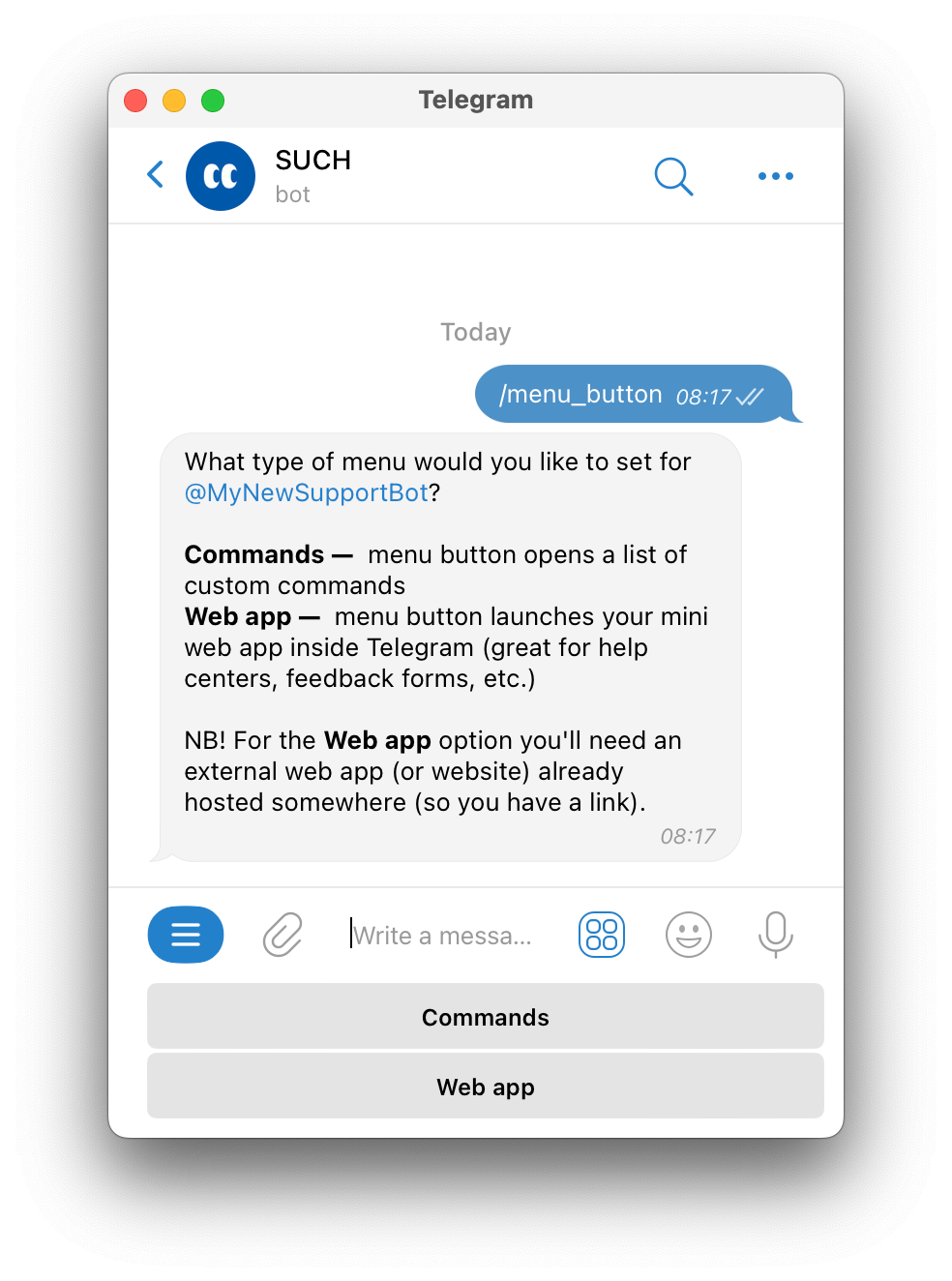
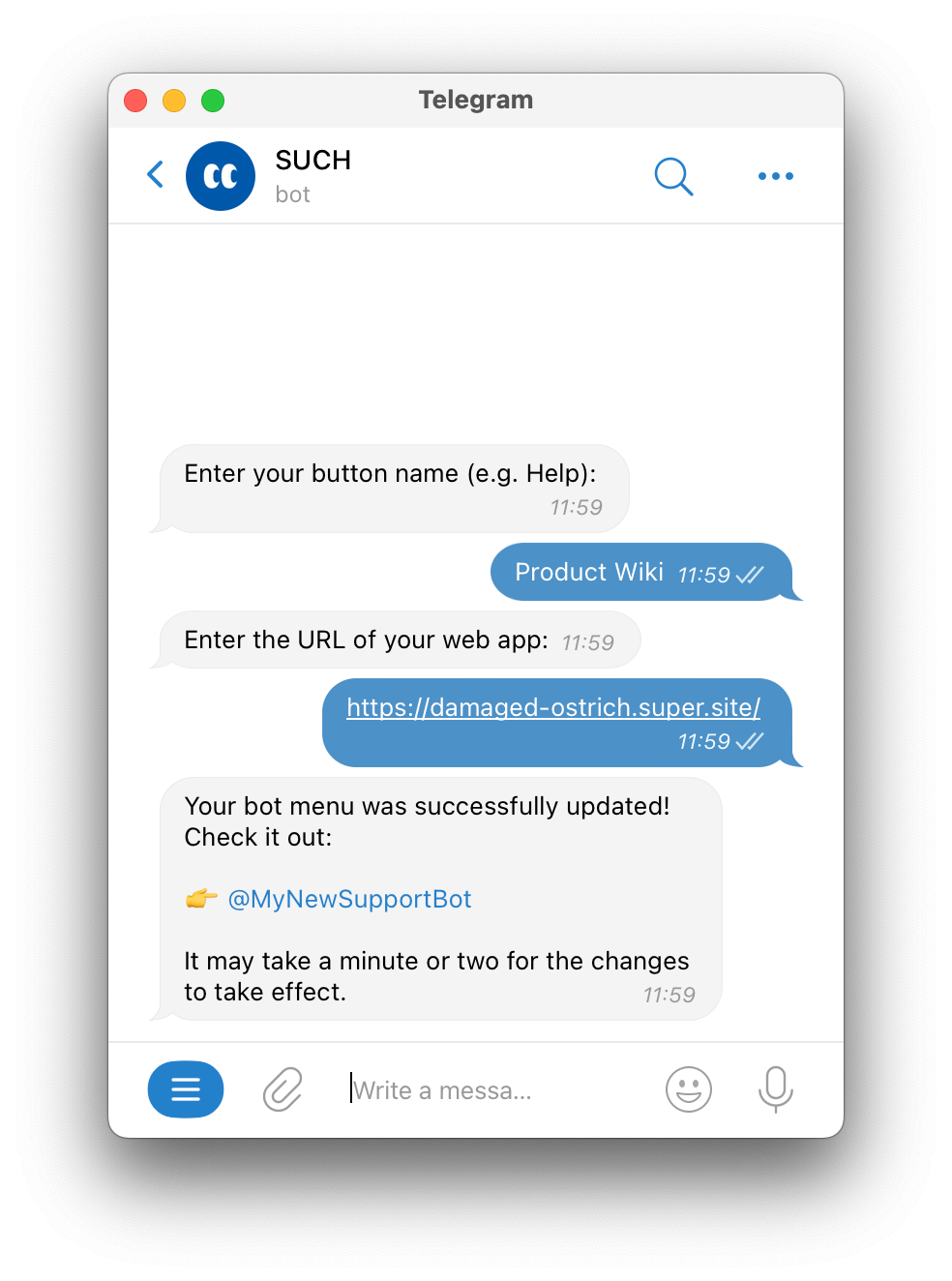
The result is one menu button that opens your page inside Telegram. If you still need to create and connect the support bot, start with a no-code Telegram support bot.
The Help Center button opens a page; it does not turn SUCH into the system behind that page. SUCH does not automatically learn which article a customer read, receive a form submission, or receive an order, payment, or account change from the website.
The same boundary applies to Bot AI. Linking a Help Center does not copy its articles into Bot Knowledge or make Bot AI quote that page automatically. Add and maintain Bot Knowledge separately when you want Bot AI to answer from approved information. If the page needs a custom interface, account lookup, or other interaction beyond opening a URL, read the Telegram Mini Apps and bots guide before treating a linked page as a custom app.
A customer may read the right guide and still need help. Make the path back obvious in the Help Center and the bot's welcome message: they can write their question in the same bot chat. Support agents can then handle questions that need context, an exception, or a decision.
If the bot's main job is selling and managing access to a paid Telegram community, that is a separate workflow from support. Use the Telegram bot route for paid communities instead.
Before sharing the bot, check the route as a customer would:
Review these pages whenever a policy, product step, or common issue changes.
No. SUCH can open an existing public Help Center through the bot's web-app button. Build a custom Mini App only when you need a custom web experience or interaction beyond opening a page.
No. A menu button only opens the page for the customer. Add and maintain the information in Bot Knowledge separately before you expect Bot AI to use it.
Check whether the bot has custom commands. Telegram shows those commands instead of the web-app menu button. Decide whether customers need one Help Center destination or several command shortcuts as the visible menu.
Standard Telegram bots, including SUCH bots, cannot start a private chat. Customers must press Start or send a message before the bot can reply.
Turn customer voice notes into readable support text with SUCH PRO. Verify important details, reply faster, and keep the original audio in view.