
Telegram for business
Boosting your Telegram Mini App success is possible with strategic promotion, ads, social media, content marketing, SUCH bots, and more.

Zachary Hacker
November 22, 2024
•
5 minutes

Set up paid Telegram or Discord access with InviteMember, use the right payment option, and add a separate SUCH bot for support.

People use "Telegram storefront" to mean two different things. You may sell a product from a custom bot or Mini App. Or you may sell access to a paid channel, group, course, community, or Discord role.
For paid access, you do not need to build a payment bot from scratch. InviteMember creates the membership flow: plans, payments, subscriptions, and access to private Telegram spaces or Discord roles. A separate SUCH bot can handle the support questions around the store.
InviteMember subscription bots run on the SUCH bot base. They do not include SUCH AI or SUCH PRO features. When a store needs a dedicated support bot, create a second bot with SUCH and give it that single job.
| What you sell | Best setup | What handles payment and access | What you need |
|---|---|---|---|
| Paid Telegram channel, group, course, community, or Discord role | InviteMember membership page and bot | InviteMember payment options and resource access | A plan and connected resources |
| One digital item with a custom delivery flow | Custom bot or Mini App | Telegram Stars and your own code | A developer and fulfilment logic |
| Shipped product or in-person service | Custom bot or Mini App | A supported payment provider and your own code | A provider account, terms, and delivery process |
| Large visual catalog with options | Mini App plus bot messages | Depends on the product | A Mini App, server, and payment setup |
Use InviteMember when a customer is buying access that lasts for a set time or renews. Use a custom payment bot when you are selling products that need a custom cart, order system, or delivery flow.
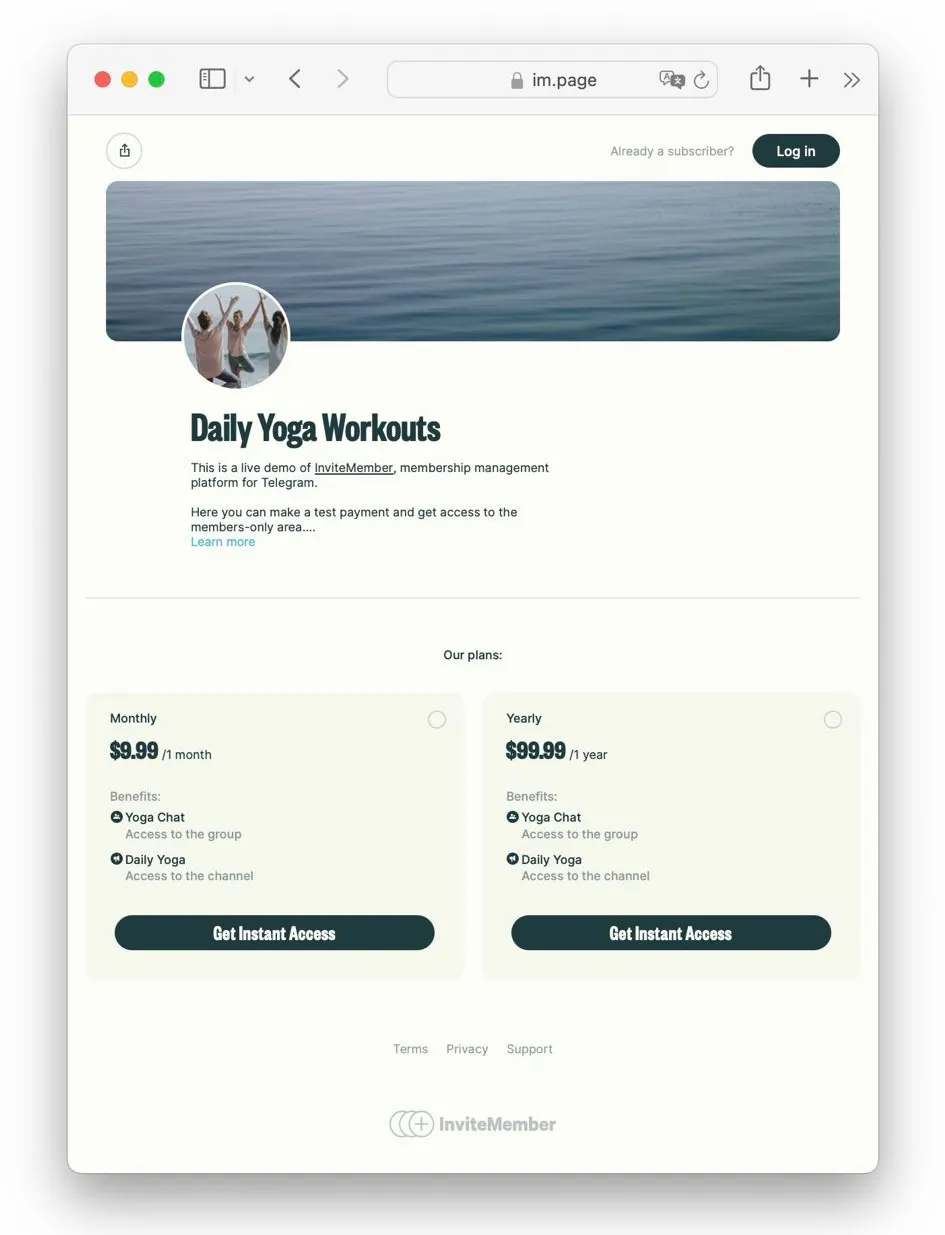
InviteMember is the simple route for a paid Telegram channel, private group, course, community, or Discord role.
After payment, InviteMember grants the resources in the customer's plan. For a Telegram channel or group, it gives the customer a join request link. For Discord, it assigns the connected role. When access ends, it removes access from the connected resource.
The membership bot can show plans, accept payments, show subscription status, and give customers their access route. That is its job. Keep store support in a separate conversation so people can get help without mixing support messages with payment and plan actions.
For a digital membership, Telegram Stars can be enabled in InviteMember. Customers can pay in Stars in the membership bot. The membership page can still offer the other payment options you have connected.
Create a second Telegram bot for store support. It can support a Telegram community, a Discord community, or both. This is where customers can ask about the offer, setup, access, common problems, and where to find things after they join.
Create the bot in @BotFather, connect it through @SUCH, then set its welcome message, commands, and team access in app.such.chat. You can add Bot AI later when you have clear instructions and correct knowledge for it to use.
Give the support bot a simple welcome message. For example: "Ask about plans, access, and how to use the community. Send /human when you need our team."
The two bots have different jobs:
| Bot | Main job |
|---|---|
| InviteMember membership bot | Plans, payments, subscription status, and access to Telegram resources or Discord roles |
| SUCH support bot | Questions, help content, human replies, and optional AI support |
The SUCH bot does not automatically read or change InviteMember payment or subscription data. When a question needs a customer-specific answer, the team checks InviteMember and replies in the support chat.
For the full setup, read how to build a Telegram AI support bot and how to hand a chat to a person.
InviteMember is for paid memberships and access. It is not a product catalog, shopping cart, or custom order system.
For a custom product store, a bot can show a short list of items in chat. A Mini App is better when customers need product images, filters, sizes, colors, or a cart. Both need a developer or a payment service for the technical work.
For digital goods and services sold inside a custom Telegram bot or Mini App, use Telegram Stars. Your code must create the invoice, answer the pre-checkout request within ten seconds, and deliver the item only after Telegram sends the successful payment update.
For physical goods and offline services, connect a payment provider supported by Telegram Bot Payments. The provider handles card details and payment processing. Telegram does not store the card data or process the provider payment.
Read Telegram Stars and Mini Apps for the payment rules. For a custom web interface, see Telegram Mini Apps and bots.
Test the route a real customer will use before you promote it.
/human and confirm that your team sees the chat and can reply.For a custom product store, also test a cancelled payment, an unavailable item, and a failed delivery. Make the confirmation and support route clear before you bring people to the store.
No. SUCH is a Telegram support-bot builder. Use InviteMember for paid membership access, or a custom bot or Mini App for a custom product checkout.
Yes. Connect a private Telegram channel or group, or a Discord role, add it to a subscription plan, and let InviteMember manage payment and access.
No. InviteMember subscription bots use the SUCH bot base, but they do not include SUCH AI or SUCH PRO features. Create a separate SUCH bot when you need those support tools.
No. InviteMember can create the paid membership flow without custom code. You need a developer for a custom product catalog, custom checkout, or Mini App.
The InviteMember bot keeps payment and access actions simple for Telegram resources or Discord roles. The SUCH bot gives people a clear place to ask questions and lets your team handle support without mixing it with subscription actions.

Boosting your Telegram Mini App success is possible with strategic promotion, ads, social media, content marketing, SUCH bots, and more.

Add a support bot to your Telegram Mini App for 24/7 help, faster responses, and better customer satisfaction.