
Telegram Guide
Need to log out of Telegram? Our ultimate 2025 guide has you covered! Plus, get bonus privacy tips to keep your account secure. Follow our easy steps for a smooth and safe experience.

Muhammad Ramadhan
July 3, 2024
•
2 minutes

Thinking of leaving Telegram? This guide will help you permanently delete your account. Use the web method by visiting Telegram's deletion page, or delete directly in the app. Remember, deletion is permanent, and all data will be lost.

If you're wondering how to delete a Telegram account (or specifically how to delete my Telegram account), this guide will walk you through the process in simple steps.
Deleting your Telegram account is permanent and erases all your messages and contacts, so proceed only if you’re sure.
Below, we provide clear instructions to delete your account immediately, as well as alternative methods and answers to common questions.
You can permanently delete your Telegram account by using Telegram’s official deactivation page. Follow these steps to delete your account right now:
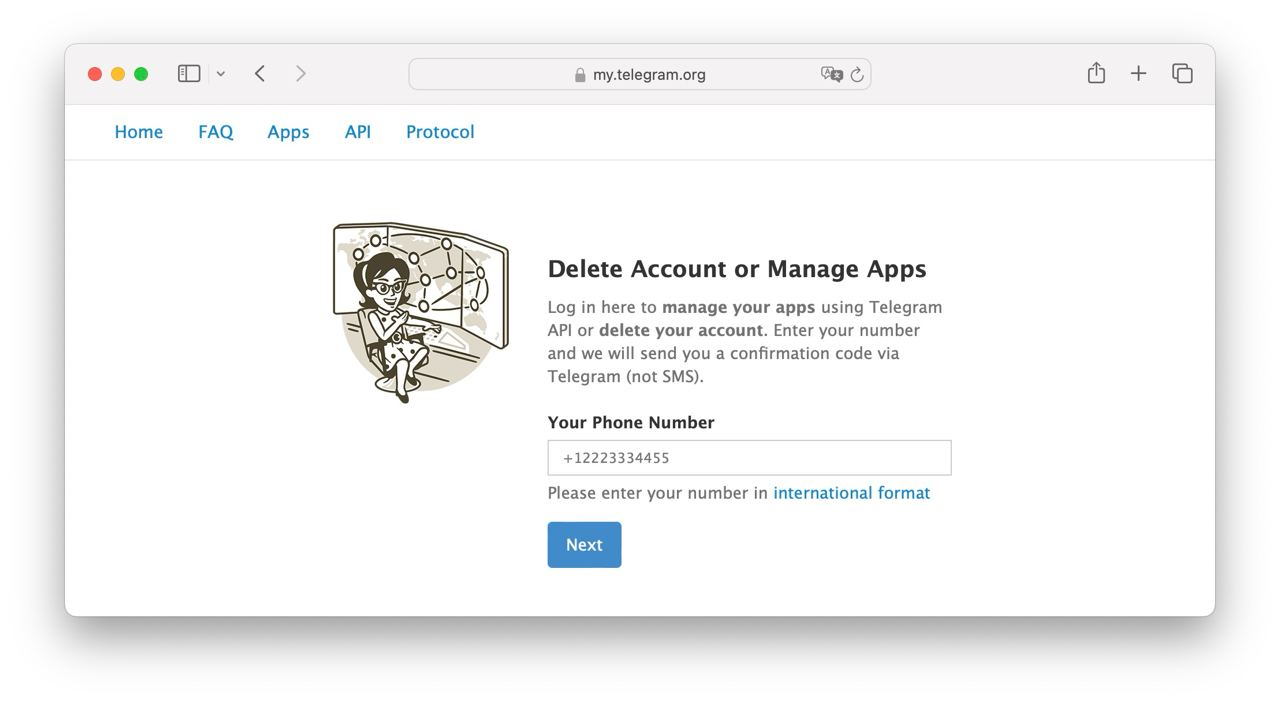
Important: Telegram warns that if you delete your account now, you might not be able to sign up again with the same number for a few daystelegra.ph. So, only delete if you’re sure you no longer need the account.
Telegram’s iPhone app provides a built-in way to delete your account (this was added to comply with Apple’s requirements).
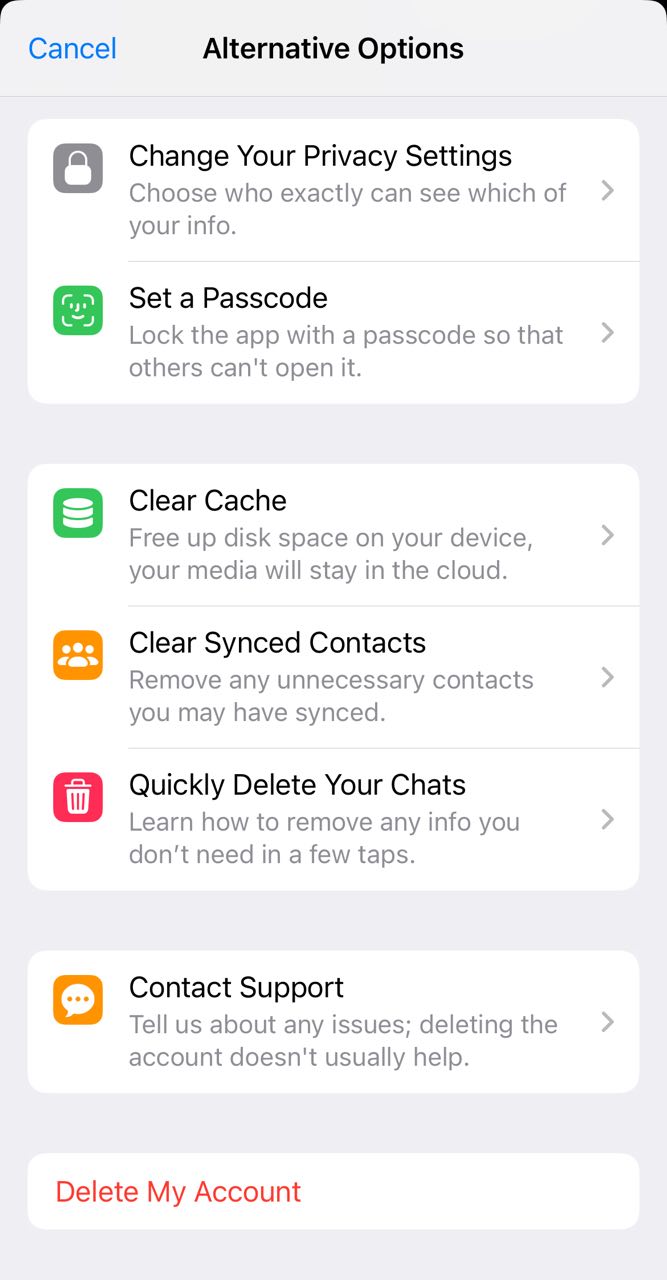
If you use Telegram on an iPhone, you can delete your account through the app itself with these steps:
After confirming, your account will be deleted just as if you used the web method. Remember that this action is irreversible and all data will be lost.
On Android, the Telegram app does not have a direct “Delete Account” button in the settings. However, you can still delete your Telegram account easily on an Android device:
Either way, the outcome is the same: once you confirm deletion, your account will be gone permanently. There is no Android-only deletion menu at this time, so using the web page is the primary method.
If you prefer not to delete your account manually, Telegram offers an auto-delete (self-destruct) option. This feature will automatically delete your account after a period of inactivity.
By default, Telegram will delete an inactive account after 6 months, but you can change this timer to 1, 3, 6, or 12 months:
After you set this, you don’t need to do anything else. If you stop using Telegram entirely, your account will be automatically deleted once the chosen inactivity period passes.
Important: Keep in mind that simply not opening the app is enough – you must stay completely inactive. Logging in again will reset the timer.
A: No. Simply uninstalling or deleting the Telegram app from your phone does not delete your Telegram account. Your account (along with your chats) will remain on Telegram’s cloud servers even if the app is gone from your device.
To actually remove the account and data, you must follow the account deletion steps (or let it auto-delete after inactivity). In short, removing the app = logout, not deletion.
A: Deleting your account permanently erases all data tied to your account from Telegram’s servers. This includes all your cloud chats, messages, photos, videos, contacts – everything will be wiped and cannot be recovered.
Any groups or channels you created will remain active, but you will no longer be the owner. If you were the sole admin, those groups/channels become ownerless (other members can still use them, but certain administrative tasks might be limited until a new admin is assigned). Essentially, your presence is completely removed as if you never had an account.
A: No, account deletion is irreversible. Once you delete your Telegram account, there is no way to get it back – even Telegram support cannot restore it.
If you sign up for Telegram again with the same phone number, it will be treated as a new account, with none of your old data or chats attached. So be certain before you delete, because you can’t change your mind later.
A: You can sign up again with the same phone number, but not immediately. Telegram notes that if you delete your account, you may have to wait a few days before creating a new one with that number.
This is likely a security measure to prevent abuse. In practice, this waiting period is short (several days). After that, you can create a fresh account with your number if you want to return to Telegram.
A: Telegram’s Android (and desktop) apps currently do not offer a built-in Delete Account button. The account deletion process is designed to be done via the web for security reasons – it ensures you verify using your phone number and a confirmation code.
Only the iOS version of Telegram has added a direct in-app delete option (due to App Store guidelines). If you’re using Android, you’ll need to use the web deletion method as described above. (Alternatively, you can enable the inactivity self-destruct as a workaround, but that requires waiting for the set period.)
A: Eventually, yes. By default, Telegram will automatically delete an account that’s been completely inactive for 6 months. You can adjust this timeframe in your settings (“Delete My Account If Away For”).
If you want your account to disappear without manual intervention, you can set this to 1 month and simply log out and wait. Just remember that logging in again will cancel that deletion timer.
A: If you have important messages or media, it’s a good idea to export your Telegram data before deleting the account. You can use the Telegram Desktop app to save your chats, since mobile apps don’t support direct export.
Keep in mind you cannot import these chats into a new account later – the export would only be for your personal backup. Once the account is deleted, the data on Telegram is gone forever.
A: Unfortunately, no – you must be able to receive the Telegram confirmation code to verify and delete the account. If you lost your phone/number and cannot log in to Telegram on any device, you won’t be able to enter the code on the deletion page.
In that case, your only option is to let the account eventually self-delete via the inactivity timer. Always make sure you have access to Telegram (on at least one device) when initiating the deletion process, because the code is sent in-app for security.
Need to log out of Telegram? Our ultimate 2025 guide has you covered! Plus, get bonus privacy tips to keep your account secure. Follow our easy steps for a smooth and safe experience.
Discover how to use Telegram's disappearing messages and secret chats for ultimate privacy. Keep your messages safe and private with these simple steps!