
Support Bots
Use a chatbot when a customer needs an answer your team has already approved and kept up to date.

Damian Ledesma
October 15, 2026
•
7 minutes

Telegram Premium price varies by country and checkout. Compare its features, account rules, Business tools, and bot limits before subscribing.
Telegram Premium is an optional subscription for one Telegram account. The free app still includes Telegram's core messaging, groups, channels, calls, and cloud storage.
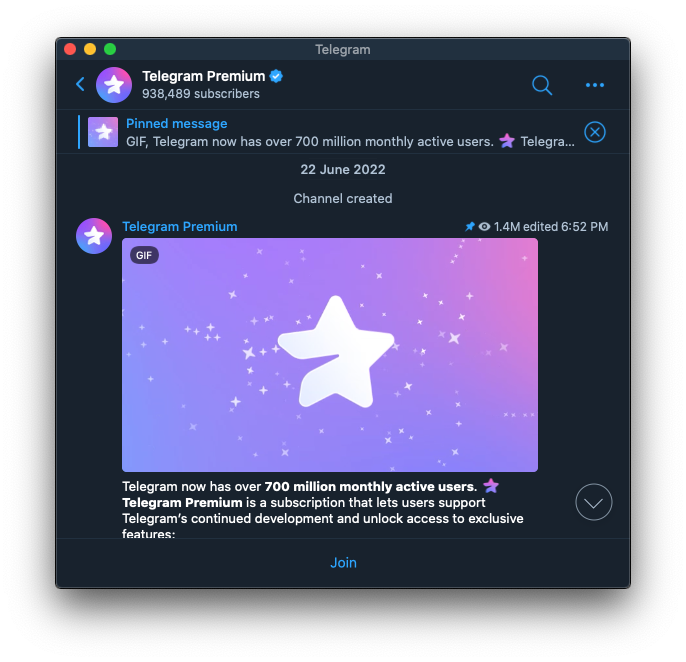
The price is not the same for everyone. It can change with your country, currency, payment method, taxes, and whether you subscribe through an app store or the official purchase bot. Open Settings > Telegram Premium in your own Telegram account to see the current monthly and yearly options before you buy.
There is no single Telegram Premium price that is accurate everywhere. Telegram localizes prices, and the amount shown through Apple, Google, or another payment route can include different fees or taxes.
For the price that applies to you, open Settings > Telegram Premium and review the subscription screen before confirming payment. Telegram also offers annual subscriptions, and the official @PremiumBot can offer a lower price in supported direct Telegram apps because app-store fees do not apply there.
Use the price in your own checkout as the decision point. A price from another country, a search-result snippet, or an older article may not match what you will pay.
The useful Premium features remove limits you actually reach.
Premium accounts can upload files up to 4 GB. Anyone who receives the file can download it, even without Premium. Premium also removes Telegram-side download speed limits, so the result still depends on the device and internet connection you use.
This matters when you regularly share long videos, large archives, or design files.
Premium can turn voice and video messages into text and translate chats or channels in real time. These features matter most when you receive support requests as voice notes or communicate across languages.
For a team that needs a customer-support workflow rather than only an individual account tool, a dedicated Telegram Business and support-bot setup solves a different problem: keeping customer conversations and replies organised across the people who handle support.
Premium raises several account limits and adds chat-management options. The exact limits can change as Telegram updates the service, but the practical benefit is more room for channels, folders, pinned chats, usernames, saved media, and other account-level organisation.
It also includes controls such as auto-archiving and muting new chats from non-contacts. They help an individual manage a busy inbox, not run shared support.
In eligible large public one-to-many channels, Premium hides Telegram's sponsored messages. It does not remove promotional posts published by the channel owner.
Premium also adds custom emoji, stickers, reactions, profile badges, app icons, and other appearance options.
Premium is usually worthwhile for a person who regularly needs at least one high-impact feature: 4 GB uploads, unrestricted Telegram-side download speed, transcription, whole-chat translation, or Telegram Business tools.
Keep the free version if you mainly chat, follow channels, use groups, and rarely hit an account limit. Telegram's normal messaging, calls, multi-device access, groups, channels, and standard file sharing remain available without a subscription.
For a quick decision, ask which of these is true for your account:
If none apply, the free version is likely enough. If one does, compare it to the price shown in your app.
These work at different levels.
Premium is attached to one Telegram account and works on that account's connected devices. It does not automatically apply to another Telegram account you own; each account needs its own subscription.
Telegram Business gives a Premium account features such as business hours, location, a start page, quick replies, greeting and away messages, chat links, and chatbot support. These are tools for the account that your customers message directly.
A dedicated support bot is a separate route. It gives customers a bot to contact and can route conversations through a support workflow. Premium can be useful alongside it, but it does not turn a personal account into a bot or give the bot a Premium subscription.
Premium subscribers can use boosts for channels and groups. A community unlocks its own level-based features only when it receives enough boosts. Buying Premium for yourself does not instantly unlock every channel or group feature.
Telegram does not offer Premium subscriptions for bots. Premium applies to a person's Telegram account.
If you are configuring recurring messages, note that repeating a scheduled Telegram message is a separate Premium feature. It does not make a bot Premium or schedule a multi-message campaign.
To subscribe, open Settings > Telegram Premium in an official Telegram app and choose the monthly or annual option available to your account. You can also check whether @PremiumBot is available in your Telegram app; it is supported in Telegram's direct Android, Desktop, and macOS apps.
After subscribing, sign in to the same Telegram account on your other devices. Premium features follow that account across supported Telegram apps, though a particular app may need an update before it shows every new Premium feature.
To cancel, use the provider that processed the subscription. If you bought through @PremiumBot, send /stop to the bot. App Store and Google Play purchases are managed through their own subscription settings. Your Premium features remain active until the end of the paid period.
You can also give Telegram Premium as a gift when you want another account to receive its own subscription.
No. Premium is a paid optional subscription. Telegram's core free features remain available without it.
Telegram adjusts prices by country and payment route. Store fees, taxes, currency, and local pricing can all change the final amount. Check Settings > Telegram Premium in the account you want to subscribe.
Yes. Premium follows the subscribed Telegram account across its connected devices and supported official apps.
No. Premium belongs to one Telegram account. A second account needs its own subscription.
No. Telegram does not support Premium subscriptions for bots.
Cancel through the provider used to purchase it. The subscription remains active until the end of the current billing period.
Use a chatbot when a customer needs an answer your team has already approved and kept up to date.
Fix a Telegram bot that does not reply by checking its connection, reply setup, AI credits, team access, or group privacy.